Jump to a section
I always get pumped about the Great LA Walk (GLAW)1. I am forever trying to rope people into it. I hunch over Adobe Illustrator and Google Maps to make my own route handouts. I prepare my social media feeds that I’m about to post a LOT of pictures. But, after trying a few different methods, I always felt like I was at a disadvantage when it came to having information when I needed it. Where’s a good restaurant that I normally wouldn’t visit? Why is this building weird? Am I still going the right way? It’s all a bit higgledy-piggledy as far as centralization goes and there are parts where we’re standing on the side of a busy road, scrolling to find information.
My apprehensiveness about AI is well-documented but, especially in looking for work in 2025 as a software engineer, I needed a reason to not get left behind. That meant spinning up a bunch of silly apps while learning the ins and outs of agentic coding: a barcode scanner and catalog for my kid’s personal library, an app that tracks the movies chosen during Criterion Closet visits, a quick safety tool for tabletop role-playing games. But once The Great LA Walk officially confirmed the route would be Wilshire, engineering convenience merged with my hopes and dreams to create an opportunity. The time had come to make a location-detecting app that showed how far you’ve walked on a route and all the locations near you that you might be interested in. This is the dream I’ve had for a decade and a half but never had the time to create2.
This post looks back through making the app: the requirements, the data plunging, the high of it being used, and the misery of it kinda/sorta failing in the field, and how I ended up fixing it later. If you ended up here because you wanted to hear about the actual journey, feel free to check out my notes and recap post on the Wilshire journey. This is a case study about a web app.
You can see it for yourself at https://www.sononick.com/great-la-walk .
How It Was Built
When I made my own handouts, it wasn’t because I thought the handouts provided by the walk organizer weren’t any good. The Great LA Walk printed handouts (also available in PDF) have always been exceptional in making sure to point out restaurants, cultural sites, and important information along the way. The only problem with the handouts at all was a problem for one person: I had my own list of places to go from various sources personal to me. Michael Schneider was not going to make me a bespoke handout yet my hunger for food exploration just growled too loudly.
The Requirements
So the app needed to do what the handout already does:
- Show the route we’re taking in an easy to read way
- Include sights to see along the way, restaurants, milemarkers, and important information
- Not be a burden to the user (a sheet of paper is easy to fold up and tuck away)
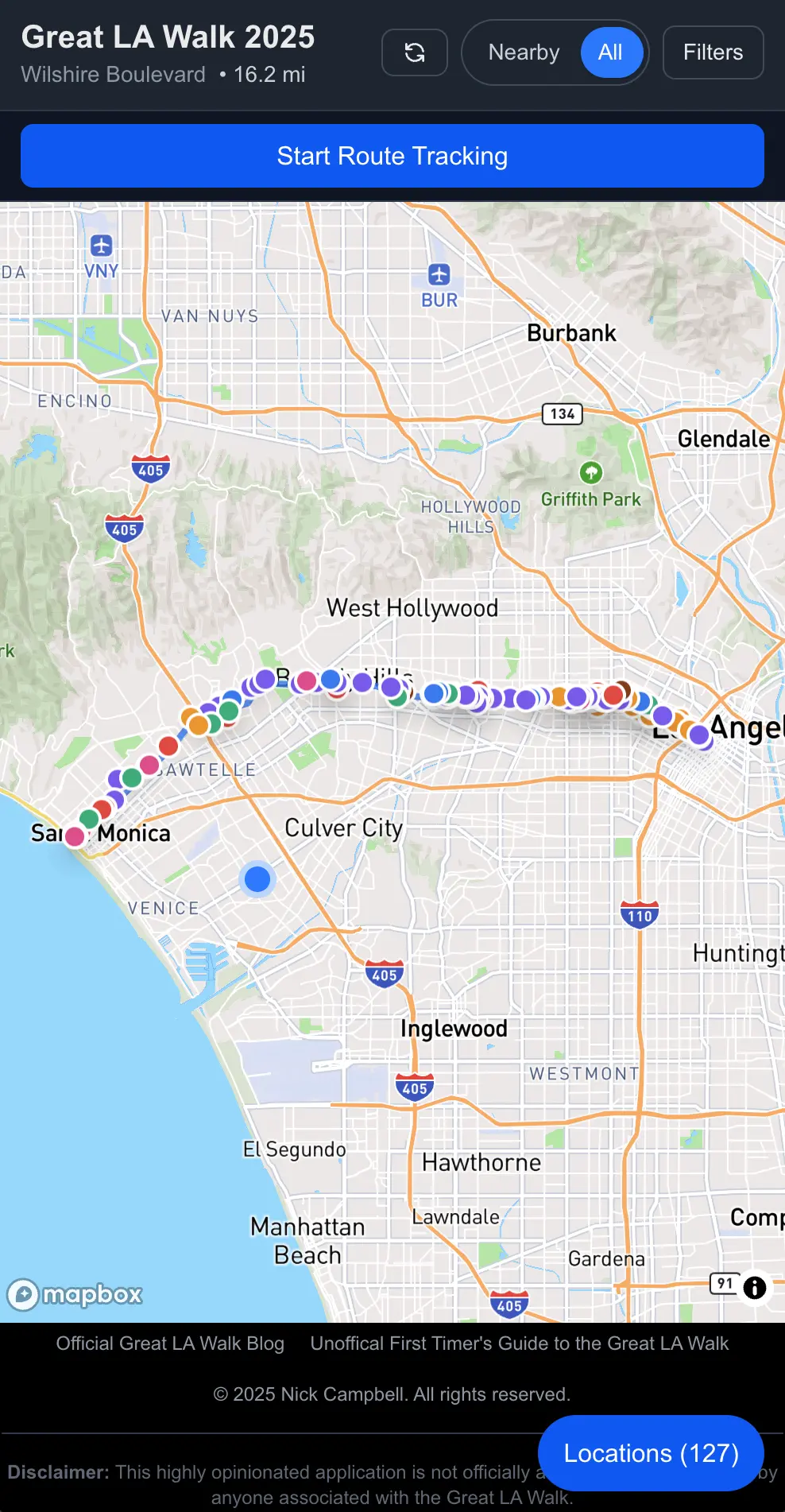
How the map greets you when you open it.
The app needed to do some of the additional things I craved:
- Locations noted in the app should come from a variety of sources I trust
- Locations should also include places that are kid-friendly, that have bathrooms, and can have supplies one might need for the trip (water, sunscreen, quick refueling like protein bars, etc)
- Locations to visit on the map can be up to a 5-minute (0.25-mile) walk off the main route.
But then, with an interactive app instead of a PDF, you can get a little more flexible with what you’re showing. So I started to get creative with what I wanted:
- The ability to zoom in on a map (rather than a fixed image of a route)
- Location information (where am I on this route)
- If you have location information enabled, you can also show where on the route you are and any statistics around that (how far you’ve traveled, how many more miles you have left)
- The ability to filter out information (see only architecture, see only coffee shops, see only the sites directly around you, etc)
- Be able to look at any route at any given time
- Mark places that you’ve visited so you can go back and remember what you saw
- Have more detailed information about each location that wouldn’t be able to fit on a double-sided single-page printout
- Get walking directions to any location based on your current location
- Share links with other people that you may be talking to on the walk
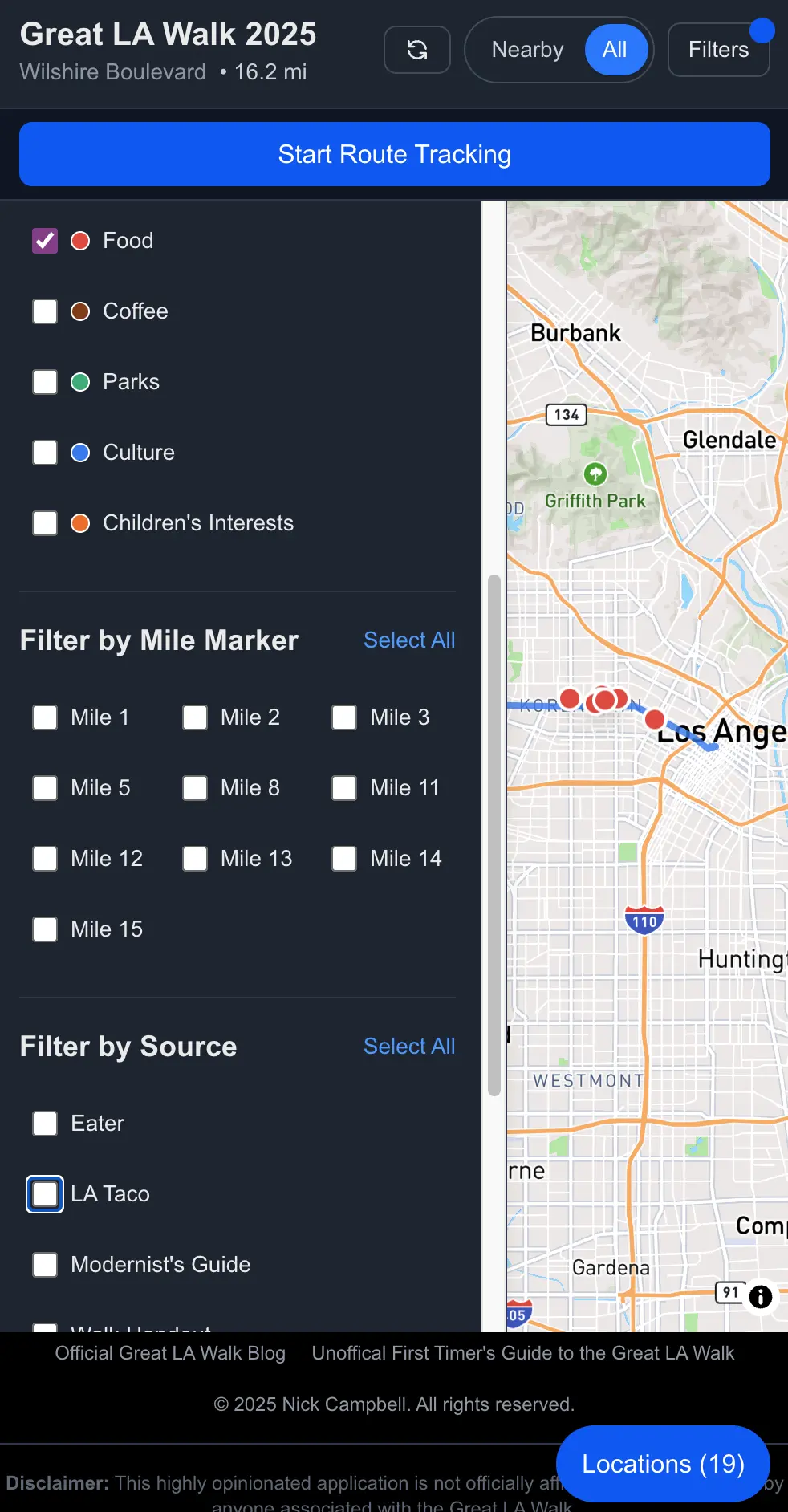
Hey, man. Nice shot of the filters.
The Technology
Because I’m a web engineer (and I wanted the app to be easily accessible), I created a React + Vite + TypeScript site with a Supabase backend. I chose a basic React site over NextJS for highly professional reasons: I know React better than the sometimes-opinionated NextJS and I didn’t want to mess around too much. React + Vite + TypeScript tends to be my basic go-to configuration and it ain’t broke so who am I to “fix” it?
Timeline was also an issue. I could have built this in React Native or Flutter relatively easily so I could dump this into the app store for easy download but it was close to the end of October into November by the time I was ready to spin something up. I didn’t need the extra hoops. A website has the least barriers to entry and a lot less overhead.
I used AI to help spin up the basic website and then tweaked the code as I saw fit. Cursor is my IDE of choice at the moment and, with only a little bit of wrangling, it performed admirably as my book-smart intern while I did the heavy-lifting of actually constructing what this app would be3. Though I did leave some crucial details up to the AI, which you’ll see later.
I used Supabase because it’s easy and I already use it to power my other projects. NoSQL/PostGRES is a flexible enough storage system for the kind of data I needed to enter while staying nimble enough to handle the load. Also, my user base would be extremely local and very small. My choices for data storage revolved around what was easiest for me. Scaling is not something I need to worry about. Yet.
A big part of what I wanted with this app was to make sure no user data was stored in the database. Even though the app asks for location data, everything stays on the user’s device. This was for two reasons: (1) I wanted retrieval to be snappy no matter what kind of signal the user had and (2) I don’t want the responsibility of storing people’s data. I’m not interested in your data, I’m not interested in going through lengths to prove to people that I’m not doing anything with your data, and, most of all, I just don’t need the hassle.
Instead, the data that the app uses (your journey so far, the places you’ve visited, the path you’re following, etc) is stored using IndexedDB on your device. Sure, it means that your path won’t follow you between devices but, for the use case, you probably aren’t carrying around your laptop and your iPad and your phone. Unless you’re out of control. But I also wanted to make it really easy for people to hop in and start using it without needing an account login. Again: no interest in keeping track of you outside of the conversation between you and your screen. I live in a state with one of the most stringent internet privacy laws in the country; your details scare me.
I used a Mapbox integration to show the map mostly because I don’t want to pay Google any more blood money than I’m already paying them and, even though the load probably wouldn’t have exceeded the free tier, I didn’t want to take my chances. Mapbox is fine and, if it’s good enough for Strava, it’s good enough for me. I also use Mapbox for the walking directions which are also, you know, fine!
The base app I spun up in a matter of an hour or so with some tweaking and incisive prompting. Maybe I should have spent some more time on it. The biggest, longest part of the app-creation journey would be getting the data I wanted.
Collecting the Data
Now I could have just wrote some scrapers to go through the last year of articles from my favorite LA food journalism and news sites to look for the word “Wilshire.” It just seemed overly complicated, though, to go through the site structures of multiple sites to come up with a list of places to visit along the way4. Besides, part of the fun of this was to find my own personal list of places to visit. So I did just that and included some old texts that I had access to: The Modernist's Guide to Iconic Wilshire Boulevard from the 2013 CivLAvia Wilshire route (thanks to the Internet Archive) and L.A.'s K-Town: Culture and Community from the LA Conservancy circa 2017.
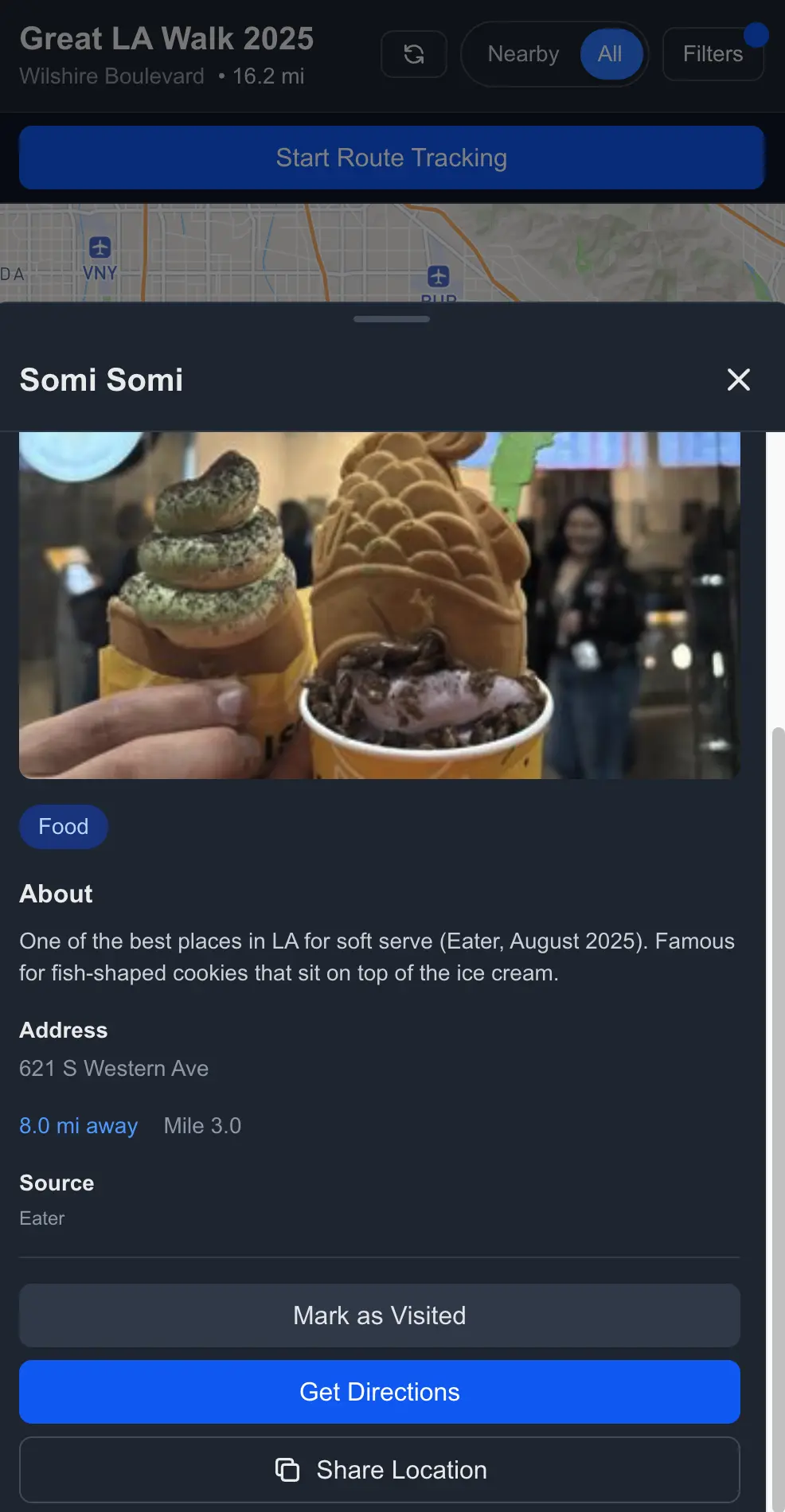
Detail screen with the Somi Somi Lab location. Did we go to this on the walk? Of course we did.
This was the bulk of the work and like a virtual Walk in itself. I dove into archives of websites to find places that people celebrated, places that looked interesting, and places that I would probably ask questions about. For instance, why is there a John Wayne statue in Beverly Hills? What does the facade on the Scottish Rite Masonic Temple mean? Why is there a terrazzo tile in MacArthur Park with people waltzing? So I ended up pulling information from:
- Eater LA (website)
- LA Taco (website)
- Atlas Obscura (website)
- The City Observed, Los Angeles (book)
- The Modernist's Guide to Iconic Wilshire Boulevard (pamphlet)
- L.A.'s K-Town: Culture and Community (pamphlet)
- LA Conservancy (website)
- The Great LA Walk handout (includes material from LA Conservancy)
- Google Maps (website, just by scrolling around Wilshire)
Disappointed at the 110 or Why You Should Test First
We stood in Pershing Square, barely able to hear Michael Schneider announce the beginning of the Walk. I’d sent the app to him the night before via email, mostly just to share it with the one person I know who would be interested (who doesn’t live in my house). He made a special entry for it on his Great LA Walk blog . I’m not a person that craves fame but this was exactly the zenith of noteriety I didn’t know I always wanted. So when I looked around the crowd, I knew that some non-zero percentage of them were about to try my app on the organizer’s suggestion.
We saw people moving toward us to let us know we’d begun. I flipped out my phone, opened up the page, and tapped the big Start button. The smirk on my face. The smug satisfaction.
We walked by the Aon Building (not too far away from the beginning of Wilshire Boulevard) when my wife said that she couldn’t get the map to load. Then my father-in-law said he couldn’t get his map to load. Then, upon crossing the 110, less than a mile into our journey, the map stopped loading for me. I restarted the browser and got it working again but it would keep crashing out.
Fear ran through me. Had I accidentally put a memory hog onto everyone’s phone? Why didn’t I bring my laptop to fix these things? Will my good name be dragged through the mud?
Well, I don’t really have a good name as of yet in the field of Great Walk apps. But I kept thinking about how so many people, including some of my favorite Dropout cast members who also do the walk, might’ve been like, “Who’s this Nick Campbell fool and why is he ruining my good time?”
After learning that I needed to kill the browser tab and restart anew to get the app to work, I finally let go of trying to use it regularly by the end of Koreatown around the four mile mark just after Western. I assumed most people did that earlier, shaking their heads in disappointment. Sad Charlie Brown music.
What Went Wrong
So what went wrong? Many, many things.
What I thought was a leak wasn’t the browser tab locking up from a lack of memory. Well, not really. More like it was trying to save our updates locally but without finishing the last thing it did. And then the problems cascaded from there.
First, when the app started communicating with IndexedDB to save things, it never explicitly closed the connection. That led to some problems when everything checked to see if connections were closed before loading the map.
// ❌ Not Great, Bob
export async function getCachedLocations(eventYear: string | number): Promise<Location[]> {
  const database = await initDB();
  const index = database.transaction('locations').store.index('by-event-year');
  const results = await index.getAll(eventYear);
  // Transaction not closed
  return results;
}
With the connections never really closed, it locked the DB or made it seem corrupted so operations would just hang. Which would be fine if there were timeouts so the spinner wouldn’t spin infinitely. Oops. No timeouts. Without a clock, the loading state would never really resolve.
So what seemed like the map locking up was actually the IndexedDB never closing its connections and the app just not being able to load because it didn’t think it was supposed to. And there was no way to recover unless you closed the tab (and any other tab you might have it open in) and visited the site again. That turn-it-off-turn-it-on-again aspect was necessary but you wouldn’t have known that because there were no descriptive errors to display even if there were timeouts.
Listen, we’re all still learning about what we can and can’t trust AI to do for us and one of those things is error handling. Unless you explicitly tell some models, it’s going to forget to handle the eventuality that an error can happen in any and every facet of your code5. I didn’t do my due diligence and so, after errors were caught, if the IndexedDB operations hung, the finally block might not execute, which means isLoading was stuck at true.
// ❌ Oh, you thought I should throw something when I hit errors?
try {
  const cached = await getCachedLocations(eventYear); // Could hang here
  // ...
} catch (cacheErr) {
  // Only catches thrown errors, not hangs
} finally {
  setIsLoading(false); // Might never execute if operation hangs
}
Then, here, at the end of the cascade the map component itself only rendered if both routeLoading and locationsLoading were false (each are set to false after the respective data flies in for an update). So, if, say, your data connection can’t push anything into your locked DB and there’s nothing there to catch the fact that your app is not closing the DB transaction, but also your map loading crucially depends on everything being collected before deigning to show anything to the user, baby, you got a crap stew goin'.
So first, let’s go ahead and explicitly close the transaction, reduce the possibility of memory leaks, and make everything a little more predictable.
export async function getCachedLocations(eventYear: string | number): Promise<Location[]> {
  const database = await initDB();
  const tx = database.transaction('locations', 'readonly');
  const index = tx.store.index('by-event-year');
  const results = await index.getAll(eventYear);
  await tx.done; // ✅ Less bad, Bob
  return results;
}
Now let’s also add a timeout so that things don’t just hang around forever and give ourselves an out if something goes wrong.
function withTimeout<T>(promise: Promise<T>, timeoutMs: number): Promise<T> {
  return Promise.race([
    promise,
    new Promise<T>((_, reject) =>
      setTimeout(() => reject(new Error(`Operation timed out after ${timeoutMs}ms`)), timeoutMs)
    ),
  ]);
}

export async function getCachedLocations(eventYear: string | number): Promise<Location[]> {
  const database = await initDB();
  const tx = database.transaction('locations', 'readonly');
  const index = tx.store.index('by-event-year');

  // ✅ You get 5 seconds before I conk out
  const results = await withTimeout(index.getAll(eventYear), 5000);
  await tx.done;
  return results;
}
And let’s put in that sweet, sweet error handling along with allowing isLoading to reset, even if an operation hangs. Now the loading state always resets, we have graceful degradation to at least an empty state, no spinner, and it doesn’t give users that screen where they don’t have control. At least not for more than 5 seconds.
const fetchLocations = useCallback(async () => {
  setIsLoading(true);
  setError(null);

  try {
    // Wrap in timeout to prevent hangs
    const cached = await withTimeout(
      getCachedLocations(eventYear),
      5000
    ).catch(() => []); // Return empty array on timeout/error

    if (cached.length > 0) {
      setLocations(cached);
      setIsLoading(false);
      return;
    }

    // Continue with network fetch...
  } catch (err) {
    // Error handling...
  } finally {
    // ✅ Always executes, even if operation hangs (due to timeout)
    setIsLoading(false);
  }
}, [eventYear, selectedCategories.join(','), enabled]);
And then we also dive deep into one of my own pet peeves. I hate error messages that don’t give specific information about what’s happening. If I’m a user, I want to know if it’s my fault (bad internet connection for example) or the app’s fault. So let’s come up with some good messaging based on the use cases we know of and make sure that, based on their values, we can communicate something to the user and, possibly, give the user some retry or bail options.
{routeLoading || locationsLoading ? (
  <LoadingScreen
    routeLoading={routeLoading}
    locationsLoading={locationsLoading}
    routeError={routeError}
    locationsError={locationsError}
    isOffline={!online}
  />
) : (routeError || locationsError) ? (
  <ErrorScreen
    routeError={routeError}
    locationsError={locationsError}
    onRetry={handleRetry}
  />
) : (
  <MapView />
)}
Say it with me: perceived performance is good performance, too!
We also had this annoying problem where any time we changed the filters, the map zoom level reset because MapView remounted when locations refreshed (aka locationsLoading briefly reset to true to repopulate the map).
First thing was that we lifted state out of the child component because we’re not animals. Then we added a hook for whether or not the user has interacted with the screen (which means that the map level may not be default, we should consult localStorage for zoom level). MapView still has some internal state it can fall back on but it’s much better for the parent to handle everything.
Then I started worrying about battery life for all this nonsense and, especially, if someone has the app open a lot during the walk. First thing I did was turn down the GPS accuracy since network-based location was fine (we didn’t need for a drone to find us to deliver a package or something). I still give you the option if you really want it, though.
I also throttled the map recalculations (to reduce the filtering frequency on map interactions) and the number of times we save to the IndexedDB (because real-time updates aren’t necessary). Every 5 seconds seems like it’s plenty and we could probably update even less often.
So what did we learn6?
- IndexedDB on mobile browsers can be sensitive to unclosed transactions, resource constraints, and background tab throttling.
- Timeouts are good for async hangs.
- Error states should communicate what the problem is.
- You have to have something in there managing transactions with the database, even if the database is a glorified JSON file in local cache.
- Don’t let your loading states just hang out there.
- Rescue your state from your children so you can supervise more of the state effects more … effectively?
- High accuracy, high volume of saves, high rate of map refreshes are for gamers, not urban hikers who value their battery.
- TEST. YOUR. STUFF. Especially before you send your fun app to a guy you respect and he advertises it on his blog with its own post. Sigh.
Going Forward
With those problems tucked away, I can actually use the app and test it out before the next walk eleven months away. We didn’t finish the walk this year for a variety of reasons but we’re planning, while my father-in-law is in town for New Years, to do the miles through Santa Monica that he didn’t get to see (minus the boring walk through Veterans Administration District). I’ve made a separate route for it in the app and plan to add more locations. And give it an actual test.
I have until November 2026 to add new features into it, too. Add a clever way to include L.A. Street Names data? Create alerts for when you’re nearby a location you’ve saved to a wish list? Show a “Wrapped” style summmary of your journey when you choose to end your route? All to play for. I really hope that peope try it again next year.
What kind of world do we live in where I hope I didn’t embarrass myself in front of the shining stars of the LA improv community? I’m so sorry, Kimia Behpoornia and John Gabrus. Please. Forgive me.
If you don’t know what GLAW is, check out my first timer’s tips and/or my recap of our 2025 journey. TL;DR: a bunch of people get together to walk across Los Angeles all day for tens of miles. It’s great. It can be life-changing. Get into it. ↩︎
I still didn’t have the time when I started building this thing. Between work that ramps up in preparation of Black Friday, a family I like hanging out with, and other obligations, there’s never a lot of time to polish anything. Every time I had an idea to build something, my level-of-effort estimate never aligned with the time I have between IRL responsibilities. But now I can drain the earth of its resources while asynchronously making a bunch of half-broken nonsense. What a timeline. ↩︎
I don’t think that anyone who would get this far into an app post-mortem would consider if AI built the whole thing or if I just used it as a tool. Engineers today (mostly, hopefully) know what that they need to use AI as a tool in their belt, not a replacement for their expertise. If you let it run wild (and you’ll see even how I probably should have had a tighter leash), it will kill you in error-solving death loops. I feel like this explanation is more for developer-curious or non-engineers. ↩︎
Why didn’t I just let the AI create the scripts? Because, as useful a tool as AI can be, having to tinker with 12 different scripts would be way more work and way less fun than actually going to the websites manually. ↩︎
This is also a problem with the robots’ teachers: humans. We also don’t do a good job of telling users what happened or gracefully degrading despite decades of programming books browbeating us into it. We just don’t consider every broken use case. I guess that’s just the sunny optimism engineers are famous for. ↩︎
And sometimes relearn. I’ve been an engineer for a long time and running teams for a while. AI sometimes blinds you to the stuff you already knew and you have to remember that it doesn’t think and it especially doesn’t think like you. The big lesson here is that, with these tools, you’ve shifted your job as a boilerplate coder to the AI but you still have to shape the application. It’s not magic. ↩︎